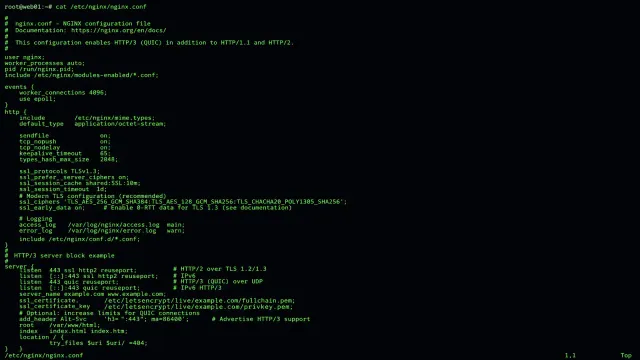
The site can look fine while nginx is already half-configured, and the NGINX module on disk is the reason. Danila Vershinin’s Oct. 1 writeup at GetPageSpeed walks through a dynamic-module mismatch that APT will let onto the box when the virtual package lies. The error he prints is the one to grep for:
nginx: [emerg] module "/usr/share/nginx/modules/ngx_http_brotli_filter_module.so" version 1029008 instead of 10310051029008 is 1.29.8. 1031005 is 1.31.5. NGINX wants those integers to match. A packaging label that still says nginx-abi-1.25.0-1 on both sides will not stop the upgrade. This is a config and package problem. It is not the CVE-2026-42533 patch note. Do not mix the tickets.
We have already had the “the box answers, the control path does not” shape in the management-console piece and, on a different clock, in the two Azure incidents. Same habit here. Ask the binary on disk before you trust the process in memory.
What the NGINX module version check actually compares
Every dynamic module gets two identities at compile time, written by the NGX_MODULE_V1 macro. Vershinin points at the loader in src/core/ngx_module.c. It checks the numeric version first. If module->version is not nginx_version, it logs an emerg and returns an error. The message is the one above: version N instead of M, with the .so path.
The second check is a signature string, NGX_MODULE_SIGNATURE. That string records pointer and type sizes, then feature bits for things like epoll, threads, file AIO, QUIC, and SSL. It does not encode the release. Two builds can share a signature and still fail the version check, because 1.29.8 and 1.31.5 are different integers even when the compile-time feature set looks alike. You cannot talk your way past this with a config flag. The loader refuses the module, and it is right to. A dynamic module has to be built against the exact NGINX it is about to load into.
In the reproduction, nginx -t fails on a specific include:
nginx: [emerg] module "/usr/share/nginx/modules/ngx_http_brotli_filter_module.so" version 1029008 instead of 1031005 in /etc/nginx/modules-enabled/50-mod-http-brotli.conf:1
nginx: configuration file /etc/nginx/nginx.conf test failed
That path matters. The new binary is fine. The file in modules-enabled is still asking for a Brotli module built for the old one. If you only read the package name nginx in the APT log, you will “fix” the wrong object.
The machine APT leaves behind
Vershinin’s end-to-end test used a third-party Debian and Ubuntu repository on Ubuntu noble. He held the Brotli module, then upgraded nginx. APT planned the upgrade without a dependency complaint. The maintainer script is where it broke. dpkg marks nginx half-configured and leaves the module packages unconfigured behind it.
Three consequences, in the order the piece lists them.
The old server keeps running. The 1.29.8 master is still in memory and still answers, in his test with ok 1.29.8. From outside the host, the site looks healthy. Your probe did not fail. Your package database did.
APT is wedged. dpkg --configure -a re-runs the same failing script. So does a later apt-get install of something unrelated, because dpkg tries to finish configuring nginx first. Security updates for the rest of the system stop until someone looks. That is the part I would put in the ticket subject. A Brotli mismatch is not only a web-server problem. It is an APT problem that happens to have announced itself through nginx -t.
The next restart is an outage. Starting the 1.31.5 binary against those module files fails with the same emerg. In the test, a direct start exited with status 1 and the port stopped answering. He could not run systemd under x86 emulation on the Apple silicon machine he used, so the systemctl restart path is inferred from the unit file and the maintainer script, not from a transcript. I am not going to pretend he watched systemd fail. The inference is reasonable, and it is labeled as an inference. On a real host, do not restart to “see.” Run nginx -t first. If the test fails and the site still answers, you are looking at the warning the piece says is the only one you get.
Why APT said the upgrade was safe
This is the part that makes the incident feel like a packaging bug instead of an operator mistake, even though a hold was involved.
Debian’s own packages encode the rule in a way APT can enforce. Vershinin’s table:
| Distribution | nginx version | Provides | A module depends on |
|---|---|---|---|
| Debian 12 bookworm | 1.22.1-9+deb12u10 | nginx-abi-1.22.1-7 | nginx-abi-1.22.1-7 |
| Debian 13 trixie | 1.26.3-3+deb13u9 | nginx-abi-1.26.3-1 | nginx-abi-1.26.3-1 |
On trixie, stream modules also pin libnginx-mod-stream between 1.26.3 and 1.26.3.1~. A Debian stable release does not change the upstream NGINX version, so that label can sit still for the life of the release. That is why I would not file this against Debian’s own nginx security upload and expect the same shape. The upstream version did not move. The ABI label did not have to.
The repository in the reproduction did not work that way. NGINX 1.31.5 provided nginx-abi-1.25.0-1. The held 1.29.8 Brotli module depended on nginx-abi-1.25.0-1. As far as the resolver could tell, the system stayed consistent. It did not. The label had stopped tracking the ABI. A dependency that froze at 1.25.0 tells APT it has no reason to stop you. It does not tell NGINX that 1029008 and 1031005 are the same module.
He set the trap with a hold:
apt-mark hold libnginx-mod-http-brotli
apt-get install --only-upgrade nginx
APT reported no unmet dependency. The configure script then failed nginx -t. Recovery, in his words, is simple once you know what to look for: unhold the module and let it upgrade. dpkg finishes configuring NGINX, and the 1.31.5 binary starts. Nothing in the APT error points you at the held package, because by the metadata there was no dependency problem. If you dpkg --configure -a in a loop, you will re-run the failure. Look at holds first.
apt-mark showholdIf Brotli, headers-more, or any other libnginx-mod-* / nginx-module-* package is on that list, that is the object to unhold, not a reason to pin nginx back by hand. I am not adding a downgrade recipe. The article’s recovery is unhold and upgrade, so the module and the binary land on the same upstream version. A downgrade you invent at 2 a.m. is how you get a second half-configured package.
The safety net, and the three holes in it
If you do not hold anything, a plain upgrade on a current distribution often moves NGINX and its modules together. Vershinin is careful: that is not the nginx-abi label working. APT 2.6 and later, which is what Debian 12, Debian 13, and Ubuntu 24.04 ship, upgrades other binaries from the same source package along with the one you named. Modules built from the nginx source travel as a group. With debug output, APT says so:
Upgrading libnginx-mod-http-brotli:amd64 < 3:1.29.8-1vendor16~noble | 3:1.31.5-1vendor1~noble @ii ugH > due to nginx:amd64That net has holes, and they are the cases worth writing into a runbook.
Holds beat source grouping on every APT version. The transcript above is that case. A hold you set in 2024 to “keep Brotli stable” will survive an nginx upgrade you intended in 2026, and it will survive it badly.
Older APT has no source-package grouping. Ubuntu 22.04 ships APT 2.4. Debian 11 ships APT 2.2. He simulated the gap with -o APT::Get::Upgrade-By-Source-Package=false. apt-get install nginx then upgrades nginx and nginx-common and leaves every module at the old version. If you still have 22.04 hosts on a third-party nginx repo, do not assume the 24.04 grouping behavior will save them. It is a different APT.
Modules from another source package are outside the group even on APT 2.6. Anything you built yourself, or pulled from a different repository than the nginx binary, will not ride along. A truthful ABI label is the only thing that can protect that module. A frozen nginx-abi-1.25.0-1 Provides line will not.
His own packages, for contrast, use a virtual that includes the upstream version, nginx-r1.31.6 style, and the same hold test fails at resolve time instead of at nginx -t. I am not reviewing his repository. The useful design point is the failure mode: a mismatch should be an unmet dependency, not a half-configured nginx and a live old master. If your third-party repo still Provides an ABI virtual that has not moved since 1.25.0, you do not have that failure mode. You have his.
Check the label before the next restart
Three commands from the piece, before you schedule anything.
What the installed nginx claims, next to what it is:
nginx -v
apt-cache show nginx | grep -E '^(Version|Provides):'
If the nginx-abi number does not match the version, the label is not tracking the ABI. That is the condition that let 1.31.5 satisfy a dependency written for a module built against 1.29.8.
What your modules are pinned to:
dpkg-query -W -f='${Package} ${Version} ${Depends}\n' 'libnginx-mod-*' 'nginx-module-*' 2>/dev/null \
  | grep -oE '(nginx-abi|nginx-r)[^ ,]*' | sort | uniq -c
One line, naming the exact running version, is what you want. Several lines, or a line that says nginx-abi-1.25.0-1 while nginx -v says 1.31.5, is the mismatch waiting for a hold or an old APT to make it real.
And before any restart after a package operation, ask the binary on disk:
nginx -tA failing nginx -t while the site still answers means the process in memory is not what the next start will run. Do not reboot to confirm. Fix the hold, let the module upgrade, run nginx -t again, and only then restart.
If nginx -t is already failing in production, the old master is your uptime. Leave it up. Unhold the module that the error names, upgrade that module to the version the new binary wants, and retest. The .so path in the emerg line is the package you are looking for. In this writeup it was Brotli, loaded from 50-mod-http-brotli.conf. Yours may be a different filter. The integer check does not care which feature the module adds.
I would also write the APT version into the same note. apt-cache policy apt is enough to tell 2.4 from 2.6. A 22.04 host and a 24.04 host do not share the grouping behavior, even when both say Ubuntu and both run nginx. Treating them as one change window is how you “test” the upgrade on the machine that was going to save you and then break the machine that was not.
What I would put in the change ticket
Write four lines before you touch production, even if you are sure the host is “just Debian.”
The APT version. Grouping is an APT 2.6 behavior. A 22.04 box will not demonstrate it. If the canary is 24.04 and the straggler is 22.04, you tested the wrong net.
The hold list. apt-mark showhold is one line. Paste it into the ticket. A hold that was reasonable when you were pinning a filter across a minor bump is the exact condition that turns a clean apt-get install nginx into a half-configured package. If the list is empty, say so. Empty is a result.
The Provides line next to nginx -v. If those two disagree, you already know the resolver cannot save you. You do not need to wait for the configure script to prove it at 1 a.m.
The nginx -t result after the module upgrade and before the restart. A pass here is the only signal that the binary on disk and the modules on disk are the same generation. A pass from yesterday, while the old master was still the process you curled, is not that signal.
If you manage more than one repository, do not assume they share an ABI virtual. Debian’s nginx-abi-1.26.3-1 and a third-party nginx-abi-1.25.0-1 are not interchangeable labels that happen to use the same prefix. One of them moves when upstream moves. The other, in this writeup, did not. A config-management template that installs “nginx plus the brotli module” from whichever repo the host already trusts will reproduce this on the hosts that trust the frozen label, and it will look like a random emerg rather than a repo difference.
I would also keep the old master up until nginx -t passes. The piece is explicit that the running 1.29.8 process can keep answering while dpkg is already wedged. Killing that process to “make the new package take” is how you convert a packaging inconsistency into an outage you caused. Unhold, upgrade the module the error named, test, then restart. If the module package you need is not in the same repository as the new nginx, you do not have a one-command fix. You have a build problem, and the article’s point about modules from another source package is the one that applies. A truthful ABI dependency would have stopped the nginx upgrade. A frozen one did not. Either way, do not restart into a .so you have not rebuilt.
None of this replaces a CVE upgrade you already scheduled. If you are on Debian’s own nginx and the upstream version is not changing, this particular mismatch is unlikely to be the thing that bites you. If you are on a third-party mainline repo, a held module, or Ubuntu 22.04, run the three commands before the next apt-get install nginx. The configure script will not give you a cleaner error than the one Vershinin already printed.